On this page
A RabbitMQ migration readiness assessment is a point-in-time gate you run before a major upgrade, platform move, or architecture change — not an ongoing health check. It confirms your topology and dependencies are fully inventoried, you know what breaks if a step fails, you have a tested rollback, and the target environment can absorb real production load.
Most teams that get burned by a RabbitMQ migration weren't running a broken cluster beforehand. They had a stable environment, a reasonable plan, and a go-live date — and they found out mid-cutover that a queue's topology only existed in one engineer's head, or that a downstream consumer was still on a client library from three major versions back, or that their rollback plan was 'restore from backup' with no idea how long that would actually take under load.
This is what a structured pre-migration readiness assessment is built to catch, before the maintenance window starts rather than during it.
What is a RabbitMQ migration readiness assessment?
It's a fixed-scope review tied to one specific planned change: a version upgrade, a move to new infrastructure (Kubernetes, a new data center, a new cloud region), or an architecture change such as adding federated replication for disaster recovery. It is not a subscription and it is not a monitoring tool.
The output is a migration roadmap and readiness report with a clear recommendation: go, go with specific fixes first, or not yet — covering every workload the migration touches, not just the broker itself. That's a different deliverable from a general health check, and it's worth being precise about the difference before you scope one.
How is a migration readiness assessment different from a general RabbitMQ health check?
They overlap in method — both examine cluster configuration, queue topology, and version status — but they answer different questions. A RabbitMQ health check asks, 'is this deployment healthy right now, and what should we fix generally?' It's run periodically, independent of any planned change, and its findings — classic mirrored queues, over-permissioned users, heartbeat misconfiguration — apply whether or not you're migrating anything.
A migration readiness assessment asks a narrower, higher-stakes question: 'can we execute this specific cutover, on this date, without an outage or data loss — and if not, what has to change first?' That framing changes the deliverables. A readiness assessment produces a rollback plan scoped to the exact migration steps, a risk register of what breaks and under what condition, and load tests run against the target configuration — not just a snapshot of current health. If you're not planning a specific cutover, you want the health check. If you have an upgrade or platform move on the calendar, you want this instead.
What should a pre-migration inventory actually capture?
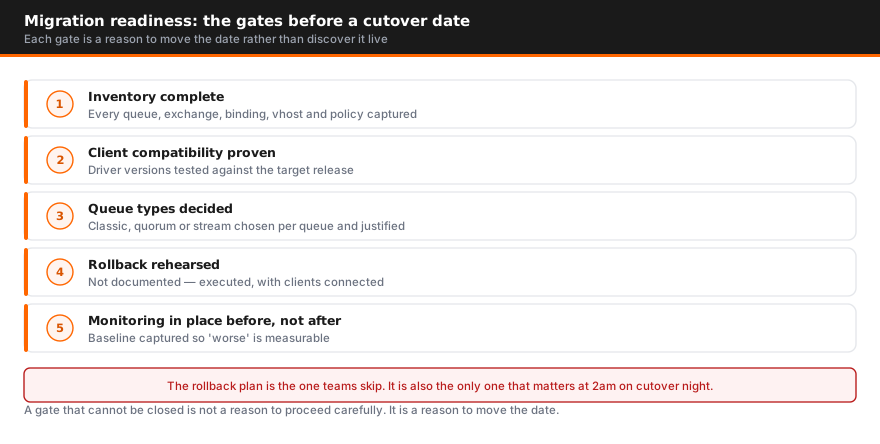
The inventory is the part teams most consistently underscope, because most of it lives outside the broker's own configuration. Four things need to be captured before you can plan a migration with any confidence:
- Queue, exchange, and binding topology — and whether it's defined in automation. We recently worked with a payments processing company whose cluster installation was fully automated, but whose queues, exchanges, and federation links were created manually and existed nowhere in code. That's a common gap, and it means the topology can't be reliably rebuilt on a new cluster without someone manually re-deriving it from the running system.
- Plugin dependencies. Federation, shovel, and any custom or vendor plugins need to be checked against the target RabbitMQ version individually — a plugin that's compatible with your current version isn't automatically compatible with the one you're migrating to.
- Client library and runtime versions in every consuming application. Not the broker version — the client. Applications running old client libraries or outdated runtimes often carry undertuned connection, threading, or memory settings that only surface as a problem once traffic patterns or broker behavior change during a migration.
- Queue type and version compatibility. Classic mirrored queues are deprecated territory heading into newer RabbitMQ major versions, and Erlang/OTP version support is tied to your RabbitMQ version — the community edition of 3.13.x, for example, doesn't support the Erlang 27 runtime, which forces a licensing conversation for any team wanting to stay current without a full upgrade.
None of this is exotic. It's just tedious enough that teams under a deadline skip it, and then rediscover it live during the migration.
How do you assess risk before a RabbitMQ migration — what actually breaks?
Risk assessment for a migration means working through specific failure conditions, not producing a generic severity-ranked list. The useful version of this exercise answers: for each step of the migration, what breaks if it fails, and what does that failure look like downstream?
A concrete example from a disaster-recovery replication project we scoped with a payments processing client: their proposed approach used federated exchanges to replicate messages to a secondary site. Federated exchanges replicate messages, not broker state — so if the DR side goes down, replicated messages back up locally rather than being lost, but a real DR drill could mean recovering a backlog in the hundreds of thousands of messages once the link reconnects. That recovery traffic lands directly on the production cluster and has to be accounted for, or it becomes its own incident.
That's the shape of a real risk assessment: message ordering guarantees, idempotency assumptions on the consumer side, whether a reconnect after an outage triggers a backlog large enough to affect production throughput, and whether client applications actually handle redelivery correctly rather than just assuming exactly-once behavior they were never guaranteed. Every one of those is specific to your architecture and your applications — a template checklist won't surface them, but working through the migration step by step will.
What does a rollback plan need to include?
'Restore from backup' is not a rollback plan for a live messaging system — it doesn't say how long recovery takes, what messages are lost in the gap, or how downstream consumers behave while it happens. A real rollback plan defines, for every migration step, the specific trigger condition that means you abort, and the specific reversal action for that step.
In practice, the pattern that works is running the current and target environments in parallel rather than migrating in place. Stand up the new cluster alongside the old one, move consumer applications over in waves, and keep the old cluster live and receiving traffic until the migrated waves have proven stable — often through an entire peak-traffic cycle. If a wave shows a problem, you route that consumer group back to the old cluster without touching anything that already migrated successfully. That only works if the rollback path was designed in from the start; it's very hard to retrofit once you're mid-cutover.
If you can't state the rollback action for a given step in one sentence, that step isn't ready to execute.
If the upgrade is also the point you move to a supported build, RabbitMQ commercial licensing covers what a commercial subscription includes and how it is priced.
How do you validate load and capacity before cutover?
Load testing before a migration has to be built from your actual traffic, not a synthetic benchmark. Pull historical queue depth and message-rate data from whatever you already have — Prometheus, Grafana, Dynatrace, or your broker's own management API — to build a realistic profile of peak throughput, burst patterns, and message size distribution before you design the test.
Two things are worth testing that teams often skip. First, test at your real peak, not average load — a payments platform we worked with was scoping a replication approach that needed to sustain roughly 2,000 messages per second sustained, and the honest answer to whether federation could hold that under network constraints required actual load testing, not an estimate. Second, test recovery from backlog, not just steady-state throughput. A cluster that handles normal traffic fine can still struggle when it has to simultaneously process a recovery backlog and live traffic at the same time — which is exactly the scenario a failed cutover or a DR failback puts you in.
If your target architecture changes queue type, adds a replication hop, or moves to different underlying infrastructure, capacity headroom that existed on the old system doesn't automatically carry over. Validate it before the go-live date, not during it.
What plugin and client library dependencies get missed most often?
Beyond the base inventory, a few dependency issues come up disproportionately often once teams are mid-migration:
- Federation and shovel plugin version drift. These plugins ship independently of the core broker and need to be re-verified against the target version — don't assume compatibility carries forward.
- Erlang/OTP compatibility tied to licensing. Community RabbitMQ on the current stable series stops receiving patches for older Erlang runtimes over time, and moving to a newer Erlang major version is sometimes gated behind a commercial license depending on your RabbitMQ series. This surfaces during migration planning far more often than teams expect, and it can turn a straightforward technical upgrade into a procurement conversation with a deadline attached.
- Client-side connection and timeout defaults tuned for the old environment. Heartbeat and TCP timeout settings tuned for on-prem, low-latency networking cause false-positive disconnects once a migration moves traffic across availability zones or through a NAT gateway — a change worth catching before cutover rather than debugging as a mystery incident afterward.
- Applications still running old client libraries or runtimes. These often carry conservative defaults — for example, JVM memory settings sized far below what a container actually has available — that quietly cap throughput and only become visible once you're trying to hit a specific performance target during migration testing.
How long does a readiness assessment take, and what do you get at the end?
Scope drives timeline. A single-cluster version upgrade with a small number of consuming applications is typically a week's engagement. A multi-region deployment with federation, custom plugins, and dozens of consumer applications takes longer to inventory, risk-assess, and load test properly — usually two to three weeks.
Either way, you should walk away with:
- A complete topology, plugin, and client-library inventory — the source of truth the migration plan is built from
- A risk register describing specific failure conditions and their downstream impact, not a generic severity list
- A rollback plan with a defined trigger and reversal action for each migration step
- Load test results against the target configuration, including backlog-recovery scenarios
- A go/no-go recommendation with any blocking issues prioritized ahead of the cutover date
- Post-migration validation criteria and a short optimization pass once the target cluster is carrying real traffic
Weigh that engagement cost against the total cost of ownership of skipping it — an unplanned rollback under production load is almost always more expensive than the assessment itself. If you're planning a version upgrade, a platform move, or an architecture change and want a structured readiness gate before you commit to a cutover date, our RabbitMQ team runs these assessments alongside the migrations themselves. Talk to us about scoping one against your timeline.
The checklist is step two of seven in the RabbitMQ migration guide, which sequences the decision, the inventory, the semantic mapping, the target build, the cutover and the validation.
FAQ
What is a RabbitMQ migration readiness assessment?
A point-in-time review run before a major version upgrade, platform move, or architecture change. It inventories your current topology and dependencies, identifies what breaks if the migration goes wrong, produces a tested rollback plan, and validates that the target environment can handle real production load — ending in a go/no-go recommendation.
How is a migration readiness assessment different from a general RabbitMQ health check?
A health check is a periodic snapshot of operational health — cluster sizing, security baseline, configuration drift — run independent of any planned change. A migration readiness assessment is scoped to one specific cutover, has a hard deadline, and produces artifacts a health check doesn't: a rollback plan, a cutover risk register, and load tests against the target state, not just the current one.
What does the current-state inventory need to cover?
Every queue, exchange, and binding and whether that topology is defined in automation or exists only as manual, undocumented configuration; every plugin in use, including federation, shovel, and any custom or home-grown plugins; and the client library and runtime version running in every application that publishes or consumes, not just the broker version.
What should a rollback plan actually include?
A defined trigger — the specific metric or failure condition that means you abort — and a reversibility statement for every step, not a generic 'restore from backup.' In practice this usually means running the old and new environments in parallel and migrating consumer groups in waves, so any wave can be routed back without touching the ones that already succeeded.
Do we still need load testing if we're not changing hardware?
Yes. A version upgrade or topology change (for example, moving from classic mirrored queues to quorum queues, or adding a replication path for disaster recovery) changes how the broker behaves under load even on identical hardware. Test against your actual peak throughput and against backlog-recovery scenarios, not just steady-state traffic.
How long does a RabbitMQ migration readiness assessment take?
Typically one to three weeks depending on cluster count and topology complexity. A single-cluster upgrade with a handful of consuming applications can be scoped in about a week; a multi-region deployment with federation, custom plugins, and dozens of consumer applications takes longer to inventory and load test properly.
What usually triggers the need for one?
A major version upgrade (especially one that changes queue type defaults or Erlang compatibility), a platform move such as onto Kubernetes or into a new data center, an architecture change like adding disaster recovery replication, or a licensing change that forces a version jump on a deadline.

Author
Talk to an engineer
Need a hand with RabbitMQ?
Senior engineers who run it in production. Get a quote or a free consultation, no sales pitch.
Go deeper on RabbitMQ
- GuideThe RabbitMQ Performance Tuning GuideRead the guide
- GuideThe RabbitMQ Streams GuideRead the guide
- GuideThe RabbitMQ Reliability Guide: Ten Failure Patterns and Their FixesRead the guide
- GuideThe RabbitMQ Disaster Recovery GuideRead the guide
- GuideThe RabbitMQ Clustering and Sizing GuideRead the guide
- GuideThe RabbitMQ on Kubernetes GuideRead the guide
- GuideThe RabbitMQ Migration GuideRead the guide
- GuideThe RabbitMQ Security and Hardening GuideRead the guide
- GuideThe RabbitMQ Monitoring and Alerting GuideRead the guide
- GuideRabbitMQ for AI Agents: Patterns, Setup and PitfallsRead the guide
- GuideCelery and RabbitMQ for LLM Task QueuesRead the guide
- GuideAgent-to-Agent Messaging over AMQP and RabbitMQRead the guide
- ComparisonRabbitMQ vs Amazon SQS ComparedSee the comparison
- ComparisonRabbitMQ vs Redis ComparedSee the comparison
- ComparisonRabbitMQ Hosting Options ComparedSee the comparison
- ComparisonMessage Broker Support Options ComparedSee the comparison
- ComparisonRabbitMQ vs Kafka vs NATS for AI AgentsSee the comparison
- ComparisonFIPS-Compliant RabbitMQ Options ComparedSee the comparison
- ComparisonCloudAMQP Alternatives for RabbitMQSee the comparison
- ResearchWhat Breaks in Production RabbitMQ: 145 Support Tickets, 2023 to 2026Read the research
- ResearchRabbitMQ in Production 2026: What 22 Assessed Estates Actually RunRead the research
- ResearchThe RabbitMQ CVE Register, 2026 EditionRead the research