
On this page
Redis evicts keys when memory usage reaches its configured memory limit, and the eviction policy determines which keys go. There are ten policies on Redis 8.6 and later and eight on older Redis and on Valkey. The default is noeviction, which does not evict at all — it starts rejecting writes with an OOM error. For a cache you almost always want allkeys-lru. For a datastore holding data you cannot lose, noeviction is correct and you size for the workload instead.
What Triggers a Redis Eviction Policy to Run?
Two things have to be true, and the first is a memory limit. Redis is an in-memory data store, so the maxmemory directive sets the ceiling. When usage reaches it, the policy runs, redis decides what to evict, and it will evict keys to free space for new data.
CONFIG GET maxmemory-policyIf the memory limit is 0 in production, that is the first thing to fix.
The Ten Redis Eviction Policies (Eight on Valkey)
| Policy | Scope | How it picks |
|---|---|---|
noeviction | — | Evicts nothing; write commands fail with an OOM error |
allkeys-lru | All keys | Least recently used |
allkeys-lfu | All keys | Least frequently used |
allkeys-random | All keys | Random |
volatile-lru | Keys with a TTL | Least recently used |
volatile-lfu | Keys with a TTL | Least frequently used |
volatile-random | Keys with a TTL | Random |
volatile-ttl | Keys with a TTL | Shortest remaining time to live |
allkeys-lrm | All keys | Least recently modified (Redis 8.6+) |
volatile-lrm | Keys with a TTL | Least recently modified (Redis 8.6+) |
Redis provides ten key eviction policies from Redis 8.6 onward. Redis 8.6.0 (February 2026) added the two least-recently-modified policies, allkeys-lrm and volatile-lrm; Redis 8.4 and earlier, and Valkey, have the other eight. A config that names an LRM policy will be rejected by an older Redis or by Valkey, so check INFO server before copying one between estates. The default behavior is noeviction, which surprises anyone assuming a cache evicts automatically — it does not until told to. allkeys-lru is the right default for a cache. These available eviction policies split into two families.
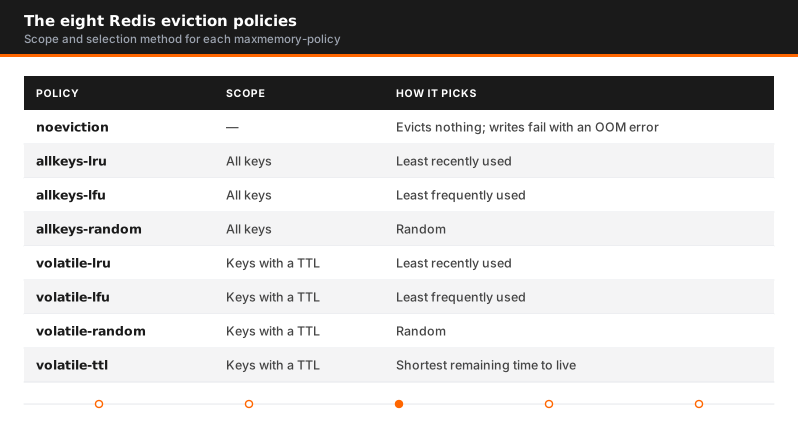
Volatile vs Allkeys Redis Eviction Policy Options
The volatile-* policies only consider keys that have a TTL set. That sounds safer — evict only the disposable things — and it has a trap.
If no keys have an expiration set, a volatile policy has nothing to evict and behaves exactly like noeviction. Memory fills, writes start failing, and the policy you configured looks like it did nothing. It did precisely what it was told.
This applies to the primary database the same way. Use a volatile option only when deliberately mixing cached data (with TTL) and persistent data (without) in one redis instance, and only when the cached portion is large enough to reclaim from. Otherwise use an allkeys policy, or split the workloads — in a Redis cluster that also keeps eviction strategies independent per shard.
How the LRU algorithm and LFU actually work
Neither is exact, and understanding why matters when tuning.
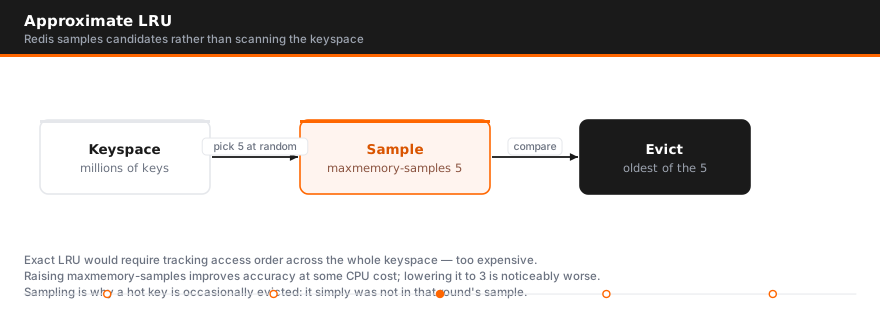
Recency-based selection is approximate. The LRU algorithm would otherwise track access order across the whole keyspace, which costs time. Instead it samples candidate keys and drops the least recently used among them — the number of samples to check is configurable:
maxmemory-samples 5Five is the default. Raising it improves accuracy at some CPU cost; lowering it to 3 is faster and noticeably worse. Sampling is why a hot key is occasionally dropped — it was not among the good candidates for eviction that round.
The frequency option tracks how often a key is used rather than when. It uses a probabilistic counter that decays over time, so keys used often keep a higher chance of remaining. Two tunables:
lfu-log-factor 10      # how fast the counter saturates for frequently accessed keys
lfu-decay-time 1       # minutes before an unused counter decays
This is the better cache policy when access patterns are skewed — a few very hot keys among many cold ones. It stops a burst of one-off reads pushing out popular data, which recency-based selection will do. With a long tail used rarely, it gives better cache performance.
allkeys-lrm and volatile-lrm: the Redis 8.6 policies
Least recently modified works like LRU with one change: the timestamp Redis uses to rank a key is only updated on writes, not on reads. Under LRU, a key that is read constantly never looks old. Under LRM, a key that is read constantly but has not been written in a long time is a good eviction candidate.
That fits read-heavy caches where freshness matters more than popularity: reference data, rendered fragments or feature payloads that the application rewrites when the source changes. Data that stopped being refreshed is usually data the source stopped producing, and LRM lets it age out even while readers keep touching it. Like LRU, it is approximate and uses the same maxmemory-samples setting.
Do not reach for it on a plain look-aside cache. If keys are written once and read many times, LRM ranks them purely by age of the write and will drop a hot key that happens to be old. allkeys-lru or allkeys-lfu is still the better default there.
How to Configure a Redis Eviction Policy
At runtime, no restart needed:
CONFIG SET maxmemory 4gb
CONFIG SET maxmemory-policy allkeys-lru
Persist it in redis.conf so it survives a restart:
maxmemory 4gb
maxmemory-policy allkeys-lru
maxmemory-samples 5
How to Monitor Redis Eviction Policy Behavior
INFO memory       # used_memory, maxmemory, maxmemory_policy
INFO stats        # evicted_keys, expired_keys, keyspace_hits, keyspace_misses
Watch three things on every eviction cycle:
evicted_keysrising steadily — undersized for the working set, or the wrong policy- Hit rate falling while eviction rates climb — recently used keys are being dropped just before they are needed
used_memorysitting at the memory limit — normal for a cache, alarming for a datastore
Redis Eviction vs Expiration
The two get confused because both make keys disappear. Expiration is per key: a key with a TTL is removed when its time runs out, whether memory is tight or not. Eviction is per instance: when used memory crosses maxmemory, Redis removes keys chosen by maxmemory-policy until it is back under the limit, TTL or no TTL.
They are counted separately in INFO stats: expired_keys for expirations, evicted_keys for evictions. If keys are vanishing and only expired_keys is moving, the TTLs are too short and no policy change will help. If evicted_keys is moving on an instance that holds state, the instance is undersized or on the wrong policy.
Why BullMQ Says the Eviction Policy Should Be noeviction
If you run BullMQ on a Redis that is also used as a cache, you will see a startup warning along the lines of IMPORTANT! Eviction policy is volatile-lru. It should be "noeviction". It is not noise. A queue keeps jobs, job locks and queue metadata as ordinary Redis keys, and an eviction policy treats them as disposable. Under memory pressure Redis can drop a waiting job or a lock, and the result is a job that silently disappears or runs twice.
BullMQ's production guide is explicit that noeviction is the only setting that guarantees correct queue behaviour. The fix is CONFIG SET maxmemory-policy noeviction plus CONFIG REWRITE on the instance the queue uses. On a managed service you change it in the parameter group or configuration rather than with CONFIG SET. If the same Redis also serves a cache that needs eviction, split them: one instance on noeviction for the queue, one on allkeys-lru for the cache. The same reasoning applies to any job queue, lock service or session store built on Redis.
The sizing mistake that crashes production
This is the part the documentation does not emphasize, and we see it repeatedly.
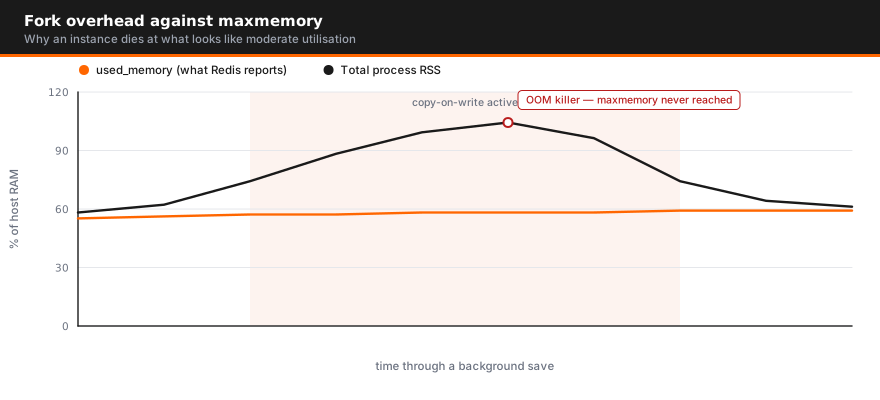
A configured ceiling does not account for what Redis needs during a background save. When Redis forks to write a snapshot, the child process shares memory with the parent via copy-on-write. Every key modified during the save causes a page copy — so under write load, total process memory climbs toward double the dataset.
We investigated a customer seeing repeated crashes at roughly 60 percent memory utilization. Nothing in the Redis metrics explained it: usage sat well under the limit and no alert threshold had been crossed. The cause was fork behavior during backups, and the fix was kernel-level overcommit tuning rather than any Redis setting.
The practical rules that follow:
- Size it to roughly 50–60% of available RAM on an instance that persists under write load. Not 80%, and certainly not 100%.
- Alert on total process memory, not just
used_memory. The metric that kills you is not the one Redis reports. - If you do not need snapshots on that instance, turn them off — the problem disappears entirely.
A Redis eviction policy is irrelevant if the process dies before eviction ever triggers.
Seeing Redis crashes that memory metrics do not explain? These usually sit below Redis — in
kernel memory behavior or persistence configuration. AceMQ runs structured Redis assessments that
find them. Talk to an AceMQ engineer.
Best practices for memory management
Always set a limit. Use the recency option for caches and noeviction for datastores. Never pick a volatile option unless keys genuinely carry TTLs. Leave headroom for fork overhead, and persist config to the file rather than only via CONFIG SET.
Any application using Redis as a cache should have its Redis eviction policy set deliberately rather than inherited. For the availability side of the same system, see Redis high availability, or Redis support and incident response for help with a production estate.
Redis eviction policy: the short answers
This is the summary we give clients at AceMQ before we open their config.
The default Redis eviction policy is noeviction. Redis will not remove anything on its own; once used_memory reaches maxmemory, every command that allocates memory fails with OOM command not allowed when used memory > 'maxmemory'. Reads keep working, writes do not. Right for a datastore, wrong for a cache, and most instances we audit never changed it.
The rule for picking a policy fits in four lines:
- Pure cache, every key can be regenerated:
allkeys-lru. - Some keys must never be evicted and you set TTLs deliberately on the rest:
volatile-lru, orvolatile-ttlif the shortest remaining TTL is the best signal of what to drop first. - A small hot set dominates traffic and the tail is noise:
allkeys-lfu. - Redis is a datastore and losing a key is worse than a failed write:
noeviction, with alerting on memory so you act before the limit.
Two facts that trip people up. Redis LRU is approximate: it samples maxmemory-samples keys (default 5) and evicts the best of that sample, so raise it to 10 if eviction quality matters more than a little CPU. And the policy only does anything when maxmemory is set; at maxmemory 0 Redis grows until the kernel intervenes.
Set it at runtime and persist it:
CONFIG SET maxmemory 4gb
CONFIG SET maxmemory-policy allkeys-lru
CONFIG REWRITE
# or in redis.conf
maxmemory 4gb
maxmemory-policy allkeys-lru
The same settings and semantics apply to Valkey, except that Valkey has no LRM policies. Sizing maxmemory is its own problem; see Redis memory for that.
The eviction mistakes we get called about
These five patterns are behind nearly every eviction-related P1 we take at Redis support: the symptom that got someone paged, the cause, and the fix.
1. noeviction left on a cache. Symptom: application errors spike at peak traffic, every one of them an OOM write rejection, while Redis itself looks healthy. Cause: maxmemory was set at some point, the policy never was, so the cache filled and started refusing new entries exactly when load was highest. Fix: CONFIG SET maxmemory-policy allkeys-lru, then CONFIG REWRITE. Then watch keyspace_misses for a week to confirm the working set fits.
2. allkeys-lru on a datastore. Symptom: users get logged out at random, a distributed lock is acquired twice, a rate limiter resets. Cause: session, lock, or counter keys live in the same instance as cache data under an allkeys policy, and Redis evicted them because they were the least recently touched. Fix: move the must-keep keys to a separate instance or database with noeviction, or switch to volatile-lru and make sure only cache keys carry a TTL. A non-zero evicted_keys on an instance that holds state is the tell.
3. volatile-* with no TTLs. Symptom: writes fail with OOM even though the policy is not noeviction. Cause: volatile policies only consider keys with an expiry, and the application never set one, so nothing is evictable and the instance behaves exactly like noeviction. Fix: either set TTLs on every cache write or switch to the matching allkeys-* policy. Check INFO keyspace first; if expires=0 next to a large keys= count, this is your problem.
4. Eviction churn hiding a memory leak. Symptom: used_memory is flat against maxmemory, hit rate is drifting down, and evicted_keys climbs faster every month. Cause: something is writing keys that are never read again (unbounded per-user keys, unexpired job payloads, a list that only grows), and eviction is quietly throwing away real cache entries to make room for garbage. Fix: sample the keyspace with SCAN and MEMORY USAGE, find the growing pattern, and cap it at the source. Eviction is not the fix here; see memory growing without more keys for the related fragmentation case.
5. Clients with no-evict holding memory. Symptom: eviction is running but used_memory will not drop, or an OOM appears on a client you would expect to be protected. Cause: since Redis 7, CLIENT NO-EVICT ON exempts a connection from the maxmemory-clients limit, and large output buffers on those connections count against maxmemory without being reclaimable through key eviction. Fix: CLIENT LIST to find the exempt connections and set client-output-buffer-limit so a slow consumer cannot pin memory forever.
What to watch on every instance: evicted_keys (should be zero on a datastore and steady, not accelerating, on a cache), used_memory against maxmemory, and keyspace_hits versus keyspace_misses. A hit rate under 80 percent on a cache under active eviction means the working set does not fit, and the answer is more memory or a smaller dataset, not a different policy. The rest of the diagnostic checklist is in Redis troubleshooting, and if you want us to review the config before it pages you, that is what Redis consulting is for.
This is step two of seven in the Redis reliability guide, which takes the problems in the order they arrive on a production estate.
FAQ
What is the default Redis eviction policy?
noeviction. Redis does not evict anything by default — once maxmemory is reached, write commands fail with an out-of-memory error while reads continue working.
Which Redis eviction policy should I use?
allkeys-lru for most caches. allkeys-lfu when a small set of keys is far hotter than the rest. noeviction when the data is not disposable and losing a key would be data loss.
What is the difference between LRU and LFU in Redis?
One evicts by recency of access, the other by frequency of access using a decaying counter. The frequency option resists a burst of one-off reads pushing out popular keys, which makes it better for skewed access patterns.
Why is my volatile eviction policy not evicting anything?
Because no keys have a TTL. Volatile policies only consider keys with an expiration set — with none, they behave identically to noeviction.
Is recency-based eviction exact?
No. It samples a configurable number of candidate keys — five by default via maxmemory-samples — and evicts the least recently used among them. Raising the sample size improves accuracy at some CPU cost.
What should I size it to?
For an instance that takes snapshots under write load, roughly 50–60% of available RAM, leaving room for copy-on-write overhead during a fork. Sizing to nearly all available RAM is how instances die at what looks like moderate utilization.
Why is Redis evicting keys when memory is not full?
Usually because maxmemory is lower than you think. Redis evicts against its own maxmemory setting, not against system RAM, so an instance on a 32 GB host with maxmemory 4gb starts evicting at 4 GB. Check CONFIG GET maxmemory and compare it with used_memory in INFO memory. The other common cause is overhead that counts toward the limit but is not key data, such as client output buffers and allocator overhead. Replica output buffers and the AOF buffer are the exception: Redis subtracts them before comparing against the limit and reports them as mem_not_counted_for_evict. If used_memory is close to maxmemory but used_memory_dataset is much smaller, the limit is being consumed by something other than keys.
How many eviction policies does Redis have?
Ten on Redis 8.6 and later: noeviction, allkeys-lru, allkeys-lrm, allkeys-lfu, allkeys-random, volatile-lru, volatile-lrm, volatile-lfu, volatile-random and volatile-ttl. Redis 8.4 and earlier, and Valkey, have the eight without the two LRM policies.
What is the difference between Redis eviction and expiration?
Expiration removes a key because its own TTL ran out, whatever the memory state. Eviction removes keys because the instance hit maxmemory, chosen by maxmemory-policy, whether or not they have a TTL. They show up as separate counters: expired_keys and evicted_keys in INFO stats.
Why does BullMQ say the eviction policy should be noeviction?
BullMQ stores jobs, locks and queue state as Redis keys, and any eviction can silently drop a job or a lock. Its production guide says noeviction is the only setting that guarantees correct queue behaviour, so it warns at startup when it finds anything else. Set maxmemory-policy noeviction on the queue instance, or give the queue its own instance if the same Redis also serves as a cache.
Sources

Author
Talk to an engineer
Need a hand with Redis?
Senior engineers who run it in production. Get a quote or a free consultation, no sales pitch.
Go deeper on Redis
- GuideThe Redis Reliability GuideRead the guide
- GuideBuying Redis and Valkey Support: The GuideRead the guide
- GuideThe Redis Backup and Disaster Recovery GuideRead the guide
- GuideRedis for AI: Vector Search, Agent Memory and MCP in ProductionRead the guide
- ComparisonRedis vs Kafka ComparedSee the comparison
- ComparisonValkey vs Redis: Where the Fork and Redis 8.0 DivergeSee the comparison
- ComparisonManaged Redis Options ComparedSee the comparison
- ResearchThe Redis and Valkey CVE Register, 2026 EditionRead the research