On this page
Consumer lag is the gap between the last message written to a partition and the last message your consumer group has committed. It is measured per partition, and it tells you whether consumers are keeping up with producers. Some consumer lag is normal — lag is a key health signal rather than a failure. Lag that grows steadily is a capacity or processing problem; lag that spikes and recovers is usually rebalancing or a downstream stall.
The number itself is less useful than its shape over time, which is where most monitoring goes wrong.
What is Kafka consumer lag?
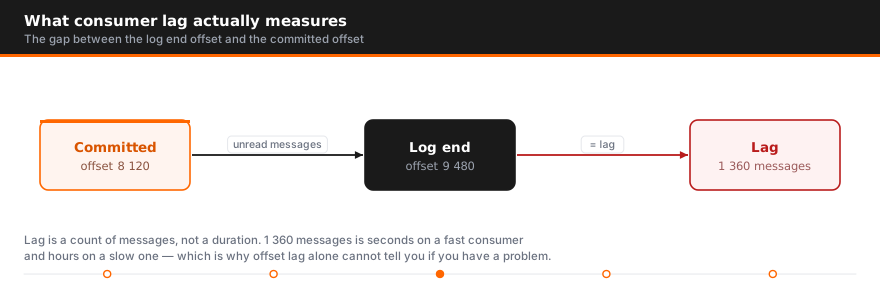
Every partition has a log end offset — the position of the newest record. Kafka offsets advance as the producer writes, and each kafka consumer group tracks a committed offset for that partition, marking how far it has processed.
Consumer lag is the difference:
lag = log end offset − committed consumer offsetA lag of 40,000 means 40,000 records are waiting. Because offsets are per partition, total lag for a consumer group is the sum across every partition it owns — and an average hides the case that matters, where one partition carries almost all of it.
Why consumer lag matters
Consumer group lag is the clearest signal that a kafka streaming pipeline is falling behind, and its consequences depend entirely on what the data feeds.
For analytics, high lag means stale dashboards. For anything operational it is worse. One deployment we assessed used vanilla open-source brokers to carry alarm and event traffic for rural network infrastructure — there, lag is not delayed reporting, it is a period where operators cannot see faults on the network at all. The pipeline looks healthy because the consumer application is running. It is simply minutes behind reality.
That is the real risk: a lagging consumer group is not down, so uptime monitoring stays green while the business impact accumulates.
How to check consumer lag
The built-in tool reports lag per partition:
kafka-consumer-groups.sh --bootstrap-server localhost:9092 \
  --describe --group my-consumer-group
Output gives CURRENT-OFFSET, LOG-END-OFFSET and LAG for each partition, plus which consumer instance owns it. Read it partition by partition:
- Every partition lagging evenly — the kafka consumers as a whole lack capacity
- One partition lagging, rest fine — partition skew, or one slow consumer instance
- A partition with no owner — more partitions than running consumers, or a consumer that died
Common causes of consumer lag
Consumer processing is slower than the kafka producer. The ordinary case. Each record takes longer to handle than the interval at which records arrive, so the backlog grows monotonically.
Not enough consumer instances. Parallelism within a consumer group is capped by partition count. Twelve partitions means at most twelve useful consumers — adding a thirteenth leaves it idle. If you are already at parity, adding consumers cannot help and you need more partitions or faster processing.
Partition skew. A poorly chosen key sends most traffic to one partition, so partition lag concentrates in one place. The owning consumer drowns while its peers idle, and aggregate throughput looks fine.
A downstream bottleneck. Slow database writes, a rate-limited API, or a struggling cache all lead to consumer lag because the consumer code is waiting rather than computing. Kafka is rarely the constraint — it usually just makes someone else's constraint visible.
Rebalancing. Every time a consumer joins or leaves, partitions are reassigned and processing pauses. Frequent rebalances produce repeated lag spikes with no underlying capacity problem.
Consumer configuration. max.poll.records too high means a batch cannot be processed inside max.poll.interval.ms, the coordinator assumes the consumer is dead, and it is evicted — triggering the rebalance that makes lag worse. This feedback loop is the single most common self-inflicted consumer lag problem.
Garbage collection pauses. Long GC stalls in the consumer application look identical to slow processing, and are easy to miss without JVM metrics alongside your lag metrics.

Counting messages vs measuring time
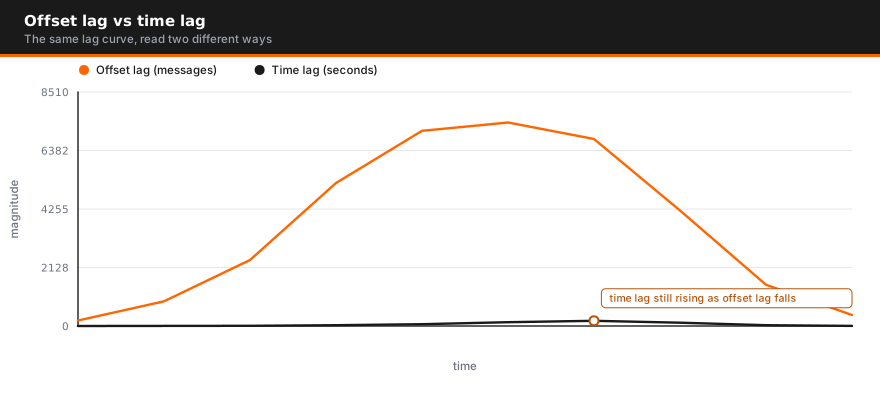
This is the distinction most monitoring misses. Offset lag counts messages; measuring time tells you how far behind the present your consumer actually is.
Ten thousand records means nothing on its own. On a topic receiving ten records a second it is roughly seventeen minutes behind. On one receiving ten thousand a second it is one second behind and entirely healthy.
Alerting on raw offset counts therefore produces both false alarms during traffic bursts and silence during genuine slowdowns on quiet topics. Where you can, derive the age of the next unprocessed record and set lag thresholds against that instead. It maps directly to the question anyone actually asks during an incident: how stale is this data right now?
Consumer lag monitoring: tools and metrics
Options, roughly in order of operational maturity:
| Tool | Best for |
|---|---|
kafka-consumer-groups.sh | Ad-hoc checks during an incident |
| Confluent / MSK dashboards | Managed monitoring |
| Kafka Lag Exporter | Prometheus metrics including an estimated time measure |
| Burrow | Consumer group status without fixed thresholds |
JMX records-lag-max | Client-side lag straight from the consumer |
| Conduktor, Confluent Control Center | UI-driven monitoring across clusters |
For most teams, lag monitoring via Kafka Lag Exporter into Prometheus with Grafana dashboards is the right baseline — it exposes lag per partition and estimates elapsed time, which the raw JMX metric does not.
Whatever you choose, monitoring kafka consumer lag alone is not enough. Track these consumer lag metrics beside kafka performance and consumer throughput, rebalance frequency, and downstream latency. Lag tells you something is wrong; those tell you what.
Alert on trend, not level. A rise sustained for ten minutes is a real signal. A momentary spike after a deploy is not.
Consumer lag you cannot trace to a cause? These problems usually sit downstream of the broker — in consumer code, partition design, or a dependency nobody is watching. AceMQ runs Kafka architecture assessments that find them. Talk to an AceMQ engineer.
How to reduce consumer lag
Scale consumer instances up to partition count. The cheapest fix when you are below parity. Beyond it, add partitions first — though repartitioning changes key-to-partition mapping and ordering guarantees, so plan it rather than doing it live.
Fix the partitioning key. If one partition carries the load, no amount of scaling helps. A key with better cardinality distributes work evenly.
Tune the poll loop. Lower max.poll.records so a batch completes comfortably inside max.poll.interval.ms. Raise the interval if processing is genuinely long. Getting these two into agreement stops the eviction-rebalance cycle.
Batch downstream writes. If each record triggers a separate database round trip, batching them is usually the largest single improvement available.
Process asynchronously where ordering allows. Decoupling the poll loop from slow work keeps the consumer responsive to the coordinator, though you take on offset-commit complexity in exchange.
Use cooperative rebalancing. Incremental cooperative assignment avoids the stop-the-world pause of eager rebalancing, so scaling a consumer group no longer halts every partition.
Consumer group rebalancing
Rebalancing is a common cause of lag spikes and the least understood.
When a consumer joins or leaves the group, partitions are reassigned. Under the eager protocol every consumer stops, releases everything, and waits for the new assignment — a pause proportional to group size. Under cooperative rebalancing only the partitions that actually move are paused.
Rebalance storms — repeated rebalances in quick succession — usually trace to consumers being evicted for missing max.poll.interval.ms, which is the configuration problem above wearing a different costume. If you see lag spiking on a sawtooth pattern, check rebalance frequency before adding capacity.
Best practices
- Monitor consumer lag per partition, never just the group total — skew hides in averages
- Alert on elapsed time where available, and on trend rather than absolute level
- Keep consumer count ≤ partition count, and know which one is your ceiling
- Keep
max.poll.recordsandmax.poll.interval.msconsistent with real processing time - Track rebalance frequency as a first-class metric next to your lag metrics
- Instrument downstream latency — the cause is usually there, not in a healthy kafka cluster
- Load-test the consumer application, not just the cluster
The broker is rarely the component that fails. It is the component that makes everything else's limits measurable. If you are weighing it against other messaging platforms, RabbitMQ Streams vs Apache Kafka covers where each fits, and AceMQ provides Kafka support and incident response for production deployments.
Lag that keeps returning is usually a design symptom rather than a tuning one — what a Kafka health check examines covers the checks that catch it first.
How to monitor Kafka consumer lag: the four ways and when each is enough
There are four places you can read consumer lag from, and they answer different questions. Picking the wrong one is the most common reason a team believes it has lag monitoring and then finds out during an incident that it does not.
- 1. The command line.
kafka-consumer-groups.sh --describeprints one row per partition the group owns.CURRENT-OFFSETis the last offset the group committed for that partition,LOG-END-OFFSETis the broker's newest offset, andLAGis the difference. It is a snapshot taken at the moment you ran it, from the committed offset, not from where the consumer actually is in memory. That makes it exactly right for a shell session when someone asks "is the group behind right now" and exactly wrong as an alert source. Nothing stores it, nothing trends it, and a cron job scraping its output is a monitoring system you will regret owning. - 2. The consumer's own JMX metrics. Every Java client exposes
records-lag-max(the worst partition it holds) andrecords-lagtagged per partition under theconsumer-fetch-manager-metricsgroup. These are the most accurate numbers available because they come from the consumer's real fetch position, ahead of any commit. The catch is that they only exist while the consumer process is alive and polling. A consumer that has crashed, hung in a poll loop, or lost its partitions in a rebalance reports nothing, and a graph with no data points looks the same as a graph at zero. If your only lag signal is client-side JMX, the failure you most need to catch is the one it cannot show you. - 3. A lag exporter feeding Prometheus. An exporter polls the brokers for each group's committed offsets and each partition's log end offset, computes the difference, and publishes it as
kafka_consumergroup_lagwith group, topic and partition labels, alongsidekafka_consumergroup_group_lagfor the group total. Better exporters also derive a time-based figure, usually named something likekafka_consumergroup_lag_seconds, by interpolating the produce timestamps of the offsets involved. The advantage over JMX is that a dead consumer still shows lag, and it shows it growing, because the exporter reads the broker and does not care whether anyone is consuming. This is the source most alerting should be written against.
4. The broker's own record in __consumer_offsets. Every commit is a message in this internal compacted topic, keyed by group, topic and partition. The exporter above is just a client of it. Reading it directly is useful for forensics, for finding when a group last committed, and for spotting groups nobody remembers creating. It is not a monitoring surface on its own, but knowing it is the source of truth explains why lag in Kafka is really "log end minus last committed offset" and nothing more.
Message counts are ambiguous across topics, as the post already argues, so write the SLO in seconds behind the log head and use the message count as the diagnostic underneath it.
kafka-consumer-groups.sh --bootstrap-server broker:9092 --describe --group orders-enricher

# Prometheus: page when a group is more than five minutes behind for ten minutes
max by (group) (kafka_consumergroup_lag_seconds{group="orders-enricher"}) > 300
Alerting on lag without paging on noise
Most lag alerts are turned off within a month because they page on every deploy and every traffic spike. The rules below are the ones we have seen survive.
- Alert on growth rate and time behind head, not the absolute count. A group sitting at 40,000 messages behind and holding is a capacity decision. A group at 4,000 and climbing 500 per minute is an incident.
deriv(kafka_consumergroup_group_lag[10m]) > 0held for a window, combined with the seconds-behind threshold above, catches the second case without paging on the first. - Set thresholds per group by its SLO. A fraud-scoring consumer and a nightly warehouse loader do not share a number. Put the seconds-behind budget in the alert rule per group, or per label, and refuse to write a cluster-wide default.
- Zero members plus non-zero lag is an incident, not a warning. The exporter exposes
kafka_consumergroup_members. When it reads zero and lag is above zero, nobody is consuming and nobody will until a human acts. Page on it immediately, regardless of how small the lag is. - Suppress during known rebalances and deployments. A rolling deploy of a twelve-instance group produces a rebalance per instance, and lag jumps every time partitions move. Silence the group's lag alert for the deploy window, or gate it on a stable membership count for five minutes. How rebalances actually work and how to shorten them is covered in our Kafka rebalance guide.
- Pair lag with consumer throughput. Lag rising while the group's
records-consumed-rateis flat or rising means the producers burst and the consumers will catch up. Lag rising while consumed rate has dropped means the consumers slowed down, and the cause is usually downstream. Same symptom, opposite response. A producer that is retrying and double-writing can also inflate lag from the other end; see our producer timeout FAQ.
The Grafana panels worth having are: lag in seconds by group, lag in messages by partition for the group you are investigating so skew stands out (if one partition carries the lag, the fix is the key, not the consumer count, see partition strategy), consumer records-consumed rate per group, and rebalance count per group over time.
On AceMQ Kafka support contracts, lag alerts route to a named engineer with a fifteen-minute P1 response. The first three questions we ask are the same every time: is the member count what it should be, is consumed rate down or is produce rate up, and is the lag on every partition or one. Those three answers separate a dead consumer, a downstream stall and a hot key before anyone opens a log. If you would rather have that setup designed once than rediscovered at 3am, our Kafka consulting engagements start with exactly this.
This is step three of ten in the Kafka operations guide, which takes the operational decisions in the order they arrive on a production estate.
FAQ
What is Kafka consumer lag?
The difference between a partition's log end offset and the consumer group's committed offset — how many records are produced but not yet processed. It is measured per partition and summed across the group.
What causes consumer lag in Kafka?
Processing slower than production, too few consumer instances for the partition count, partition skew, downstream bottlenecks, frequent rebalancing, or a poll configuration that gets consumers evicted mid-batch.
How do I check consumer lag?
Run kafka-consumer-groups.sh --describe --group <name> for per-partition LAG. For continuous monitoring use Kafka Lag Exporter with Prometheus, Burrow, or the client-side records-lag-max JMX metric.
Is some consumer lag normal?
Yes. Lag near zero at all times usually means you are over-provisioned. What matters is whether it is stable, and how much delay it represents rather than how many messages.
How do I reduce Kafka consumer lag?
Scale consumers up to partition count, then add partitions if you are already at parity. Fix skewed partition keys, batch downstream writes, and tune the poll loop so batches finish inside the interval.
Why does adding more consumers not reduce lag?
Parallelism within a consumer group is capped by partition count. Once consumers equal partitions, extra instances sit idle. Add partitions or make processing faster instead.
Should I measure messages or elapsed time?
Offset lag counts unprocessed messages; elapsed time measures how far behind the present the consumer is. Time is the more useful signal, because the same offset lag can mean one second or one hour depending on throughput.
How does rebalancing affect lag?
Reassignment pauses processing, so lag climbs during every rebalance. Eager rebalancing stops the whole group; cooperative rebalancing pauses only the partitions that move. Frequent rebalances usually mean consumers are being evicted for exceeding max.poll.interval.ms.
How do I monitor Kafka consumer lag?
Use kafka-consumer-groups.sh --describe for a one-off check, and run a lag exporter that reads committed offsets from the brokers and publishes kafka_consumergroup_lag to Prometheus for continuous monitoring. Alert on the exporter, not on the consumer's JMX metrics, because JMX lag disappears when the consumer dies and the exporter keeps reporting. Graph lag in seconds behind the log head by group, lag in messages by partition, and consumer throughput next to each other in Grafana. Lag by itself tells you something is behind; throughput tells you whether the consumer slowed or the producer sped up.
What is a good Kafka consumer lag threshold?
There is no universal number. A message count means nothing without the topic's throughput, so set the threshold in seconds behind the log head and derive it from what the consumer is for. Sub-minute for anything a user or a fraud decision waits on, a few minutes for enrichment and event fan-out, an hour or more for batch loaders. Then alert on the rate of change, not just the level: a group holding steady at a high number is a capacity discussion, and a group climbing from a low number is an incident. Write one threshold per group and revisit it when the consumer's job changes.
Sources

Author
Talk to an engineer
Need a hand with Kafka?
Senior engineers who run it in production. Get a quote or a free consultation, no sales pitch.
Go deeper on Kafka
- GuideThe Kafka Operations GuideRead the guide
- GuideThe Kafka Buyer's GuideRead the guide
- GuideThe Kafka Monitoring and Alerting GuideRead the guide
- GuideThe Kafka Migration GuideRead the guide
- GuideKafka for AI Agents Without Confluent CloudRead the guide
- ComparisonNATS vs Kafka: Core NATS, JetStream and Kafka ComparedSee the comparison
- ComparisonMosquitto vs Kafka: MQTT Broker or Event Log?See the comparison
- ComparisonKafka vs Kinesis ComparedSee the comparison
- ComparisonSelf-Hosted Kafka vs Managed Cloud KafkaSee the comparison
- ComparisonKafka BYOC (Bring Your Own Cloud) Options ComparedSee the comparison
- ComparisonConfluent Alternatives and Competitors After the IBM AcquisitionSee the comparison