On this page
RabbitMQ Streams is a queue type that stores messages in a replicated, append-only log, so many consumers can read the same history independently and replay it from any offset. It runs inside a RabbitMQ broker, which puts routing and replay in one place; Apache Kafka is the dedicated platform for very high sustained volume and long retention. This guide covers how RabbitMQ Streams work, how fast they are, how to tune them, and where Kafka is the better choice.
The short version: if you already run RabbitMQ and need replay, RabbitMQ Streams is very likely the answer. If you are ingesting hundreds of thousands of messages per second and retaining them for weeks, Kafka is. For the wider decision across queues, streams and Kafka, see RabbitMQ vs Kafka.
What a stream actually is
A classic RabbitMQ queue is destructive: a message is delivered, acknowledged, and gone. That model suits work distribution — one consumer takes a job, does it, and it disappears.
A stream is the opposite. It is an append-only log on disk. Consumers read at their own offset and reading changes nothing, so ten independent applications can each read every message and replay from the beginning whenever they need to.
That non-destructive model is what the two systems share, and it is why they get compared at all. Everything else about them differs.
If you have already decided on streams and need to run them, the RabbitMQ Streams guide covers retention, offsets, super streams, replica management and what a publisher confirm does and does not guarantee.
RabbitMQ Streams vs Kafka: the architectural difference
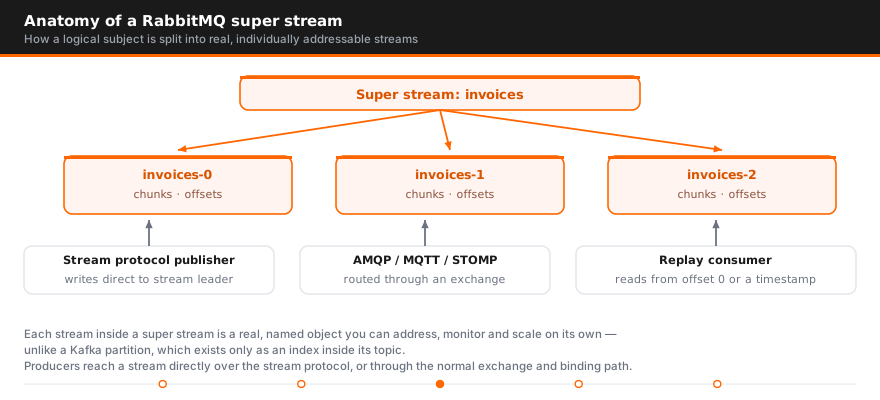
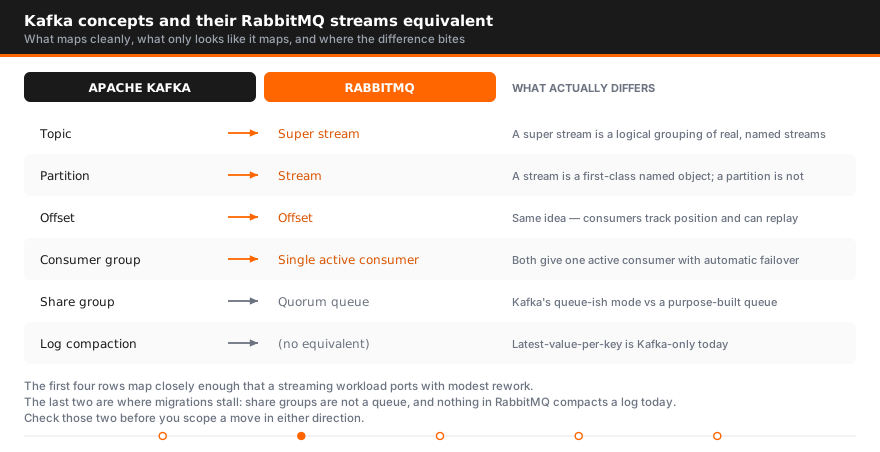
Kafka is a distributed event streaming platform, and that phrase is doing real work. A Kafka topic is split into partitions spread across the cluster; a producer writes to a partition, and consumers in a group each own some partitions. Parallelism, ordering, and throughput all derive from that partition model.
RabbitMQ is a message broker that gained a stream queue type. The same cluster that routes work through exchanges and bindings can also hold streams, reachable over AMQP or a dedicated binary stream protocol. RabbitMQ supports both models in one place — you are adding a capability to a broker, not adopting a second platform.
That single structural fact explains most of the practical differences below.
RabbitMQ Streams vs Apache Kafka: key differences
| RabbitMQ Streams | Apache Kafka | |
|---|---|---|
| Primary strength | Routing plus replay in one broker | Volume and retention at scale |
| Protocol | AMQP 0-9-1 and 1.0, MQTT, plus a stream protocol | Kafka's own binary protocol |
| Partitioning | Super streams | Native topic partitions |
| Retention | Size and time limits per stream | Size, time, or compaction per topic |
| Ordering | Per stream, or per partition in a super stream | Per partition |
| Typical volume | High — tens of thousands per second | Very high — hundreds of thousands and beyond |
| Ecosystem | RabbitMQ tooling and clients | Connect, Streams API, ksqlDB, large ecosystem |
| Operational weight | One broker, familiar model | A platform to run in its own right |
Message handling, retention, and ordering
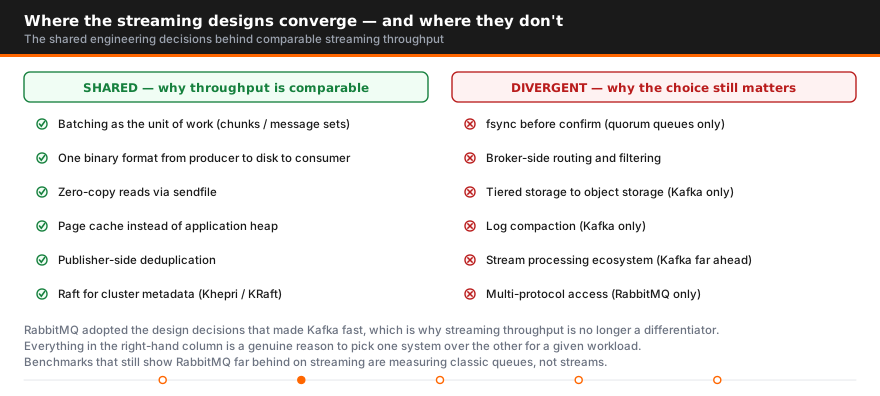
Both retain data on disk and let consumers replay it. A Kafka topic retains messages with time-based, size-based, or compacted policies, and compaction — keeping only the latest value per key — is genuinely distinctive; RabbitMQ streams do not offer it.
Ordering works the same way in both: guaranteed within a partition, not across them. If strict global ordering matters, you need a single partition in either system, and you give up parallelism to get it.
The difference appears in routing. RabbitMQ can apply exchange bindings, topic patterns, and headers before a message ever reaches a stream. A Kafka producer chooses a topic and a partition key, and routing logic lives in your application or in stream processing downstream.
Performance and scalability
Kafka throughput wins outright, and the gap is real at the top end. A Kafka broker is built for sequential disk writes, and the partition model scales writes horizontally in a way a single stream does not.
RabbitMQ streams are far faster than classic queues and handle high-volume workloads comfortably — but a super stream is partitioning bolted onto a broker whose center of gravity is routing, not a platform engineered from the ground up for sequential disk throughput.
Latency is closer than throughput. For per-message latency at moderate volume, RabbitMQ is frequently the better performer, because Kafka's batching optimizes for bulk over individual message speed. If your requirement is "this message must arrive in single-digit milliseconds" rather than "we must absorb a million events a second", do not assume Kafka is the faster choice.
Benchmarks in either direction should be treated carefully. Vendor numbers are produced under conditions chosen to flatter the system being sold, and your message size, durability settings, and network will move the result more than the software choice.
RabbitMQ Streams or Kafka: which is easier to operate?
RabbitMQ, generally — and that is a legitimate deciding factor rather than an admission of weakness.
The RabbitMQ deployment model maps closely to how most developers already think: producers, exchanges, queues, consumers. RabbitMQ brokers behave predictably. Client libraries exist for every language, the management UI is genuinely usable, and a working cluster is achievable in an afternoon.
Kafka asks more. Partition counts, consumer group rebalancing, offset management, retention tuning, and replication settings all have to be understood before production. The payoff is a system that scales further than RabbitMQ will — but the learning curve is real, and
The honest framing: choose the system your team can operate at 3am, not the one that wins a benchmark.
Can RabbitMQ Streams replace Kafka, or the other way around?
Partially, in both directions, and badly in both directions if forced.
Kafka replacing RabbitMQ struggles wherever you need routing. Kafka has no equivalent of exchange bindings, per-message TTL, priority queues, or dead-letter behavior. Reproducing those means building them in application code — a lot of work to avoid running a broker you already understand.
RabbitMQ replacing Kafka struggles at sustained volume and retention. If you are keeping a month of events for reprocessing at hundreds of thousands of messages per second, streams are not the right tool, and the ecosystem gap matters too: Kafka Streams, Connect, and ksqlDB have no direct counterpart.
Both can do the other's job for a while. The failure arrives at scale or at complexity, which is exactly when a migration is hardest.
When to use both
Plenty of mature architectures run both, and it is not a failure of design.
A common shape: RabbitMQ handles command and control — request/reply, task distribution, event-driven microservices needing precise routing — while Kafka carries the high-volume event firehose that analytics and stream processing consume. Each system does what it is good at, connected by a bridge or an application that reads from one and writes to the other.
The cost is two systems to operate, monitor, and staff. Worth it when the workloads genuinely differ; not worth it to avoid one difficult conversation about which to standardize on.
Which is best for your specific use case
Use RabbitMQ when:
- You already run RabbitMQ and need replay or multiple independent readers
- Routing matters — topic patterns, header-based routing, complex topologies
- You need queues and streams and would rather not run two platforms
- Per-message latency matters more than aggregate volume
- Your team is small and operational simplicity has real value
Use Kafka when:
- Ingest volume is genuinely very high and sustained
- You need long retention, replay across weeks, or log compaction
- Your streaming use cases need the wider ecosystem — Connect, Streams API, ksqlDB
- Many independent teams consume the same data streams
- You have, or will hire, the operational expertise it requires
Choose both when you have distinct workloads that genuinely suit each, and the operational capacity to run them properly.
Streams are not always the answer inside RabbitMQ either
Worth stating plainly: if your workload is task distribution rather than event replay, a quorum queue remains the correct choice. Streams add retention and replay you may not need, and they store everything on disk, so a stream holding data nobody replays is expense without benefit.
The queue-versus-stream decision inside RabbitMQ comes first, and often removes the Kafka question entirely. See
RabbitMQ streams performance: what to expect
A RabbitMQ stream is an append-only log on disk with one writer, the leader member. That single writer is why a stream is fast: no per-message routing, no queue index churn, no deletion on ack. It is also the ceiling. Throughput scales per stream up to what one leader can append and replicate, and beyond that with the number of streams spread across the cluster. Need more? Add streams, not a bigger box.
How you talk to the stream matters more than almost anything else. The native stream protocol on port 5552 (the rabbitmq_stream plugin) is a binary protocol built for logs: publishers send batches in one frame, the broker writes chunks straight to the file, and consumers read those chunks back with sendfile from the page cache with almost no per-message work in Erlang. AMQP 0-9-1 access to the same stream (x-queue-type: stream) goes through the regular channel machinery: one delivery per message, mandatory prefetch, per-message acks. It is convenient for existing code and an order of magnitude or more slower on reads. With the stream protocol and batching, a single stream on ordinary hardware reaches hundreds of thousands of messages per second, and a cluster with several streams reaches into the millions. Over AMQP, tens of thousands per second per stream is the realistic range.
Sub-entry batching pushes the native protocol further: a publisher packs many messages into one entry and compresses it (gzip, snappy, lz4, zstd), and the broker stores the batch as a unit, so disk and replication cost is paid once per batch. AMQP consumers cannot read sub-entry batches.
Replication is leader plus replicas using the Osiris log replication library rather than Raft. A publish is confirmed once a majority of members have written it to disk. Extra replicas cost the leader outbound bandwidth and add the slowest replica's disk latency to confirm time; they do not cost read throughput, since consumers can read from replicas.
Disk behaviour is the part people underestimate. Writes are sequential and cheap. Reads of recent data come from the OS page cache and are close to free; a consumer replaying from last week goes to disk and competes with the writer. Long retention plus rewinding consumers needs page cache headroom: RAM for the kernel, not the Erlang VM.
Retention is enforced per segment. max-age and max-length-bytes set the window, stream-max-segment-size-bytes (default 500 MB) sets the granularity, because the broker only deletes whole segments. Neither affects publish speed much; they decide disk usage and replay cost.
Offset tracking is not free either. Server-side offset storage writes tracking entries into the stream itself, so committing after every message roughly doubles a consumer's write load. Commit on an interval and accept a few redeliveries on restart.
How to tune RabbitMQ stream performance
In the order we reach for them:
- Use the stream protocol and a stream client. If your hot path is on AMQP, this change is worth more than everything below combined.
- Batch on the publisher, confirm asynchronously. Stream clients batch by default; raise the batch size and never wait for a confirm per message.
- Give consumers credit. The protocol is credit based: the consumer asks for chunks and the broker sends until credit runs out. Keep several chunks outstanding.
- Split with super streams. A super stream is a set of partition streams behind one name; publishers pick a partition by routing key, hashed by default. Ordering holds inside a partition and nowhere else, so choose a key that groups what must stay ordered (account, device, session) and spreads the rest. Partitions get different leaders, which is how you use every node.
- Set replication deliberately.
x-initial-cluster-sizeat declaration controls member count. Three for anything that matters, one for replayable scratch ingest. - Put members on fast local disks. NVMe over network-attached volumes, and not shared with quorum queue data.
- Size retention for your replay pattern. Short retention if consumers stay near the head; modest retention and generous RAM if they rewind hours. Cluster sizing itself is covered in our HA and disaster recovery sizing FAQ.
- Commit offsets on an interval. Every few seconds or every few thousand messages.
- Keep AMQP consumers off high-throughput streams. Fine for a dashboard, wrong for the main consumer.
- Watch the right metrics. The management UI shows per-stream publishers, consumers and the leader node; the Prometheus endpoint exports stream connection, publisher and consumer counts alongside queue-level message and byte rates. Consumer lag is a client-side number, so export it from the application.
A retention policy looks like this:
rabbitmqctl set_policy stream-events "^events\." \
  '{"max-age":"7D","max-length-bytes":50000000000}' --apply-to queues
The two mistakes we see most. First, one stream for everything: a single leader capped on one node, every consumer filtering client-side, and a replay that reads terabytes to find one tenant. Partition with a super stream or use several streams. Second, treating a stream like a queue: expecting per-message acks, competing consumers that share work, messages gone once handled. A stream keeps everything until retention, every consumer reads everything, and acks do not exist. If the workload wants queue semantics, it wants a quorum or classic queue, not a stream.
If your streams are slower than they should be, RabbitMQ support will read the configuration and metrics with you; RabbitMQ consulting covers redesign when the topology is the problem.
Talk to an AceMQ engineer
If the question behind this article is architecture rather than a live incident — partition strategy, sizing, security design, a migration — AceMQ's Kafka consulting puts a named senior engineer on it.
FAQ
What is the difference between Kafka and RabbitMQ Streams?
Both provide a replayable append-only log. RabbitMQ Streams is a queue type inside a message broker that also does sophisticated routing; Kafka is a dedicated distributed event streaming platform built for very high throughput and long retention.
Is RabbitMQ easier to use than Kafka?
Usually. Its model maps to familiar producer/consumer concepts, the management UI is straightforward, and a cluster is quick to stand up. Kafka requires understanding partitions, consumer groups, offsets, and rebalancing before production.
Kafka or RabbitMQ — can one replace the other?
For simple pub/sub, often yes. For anything needing routing, per-message TTL, priorities, or dead-lettering, you end up rebuilding broker features in application code.
Can RabbitMQ Streams replace Kafka?
For moderate volumes with replay requirements, yes. At very high sustained throughput with long retention, or where you need Connect and the Streams API, Kafka remains the better fit.
Which messaging system performs better?
Kafka for sustained throughput; RabbitMQ is often better for per-message latency, since Kafka batches for throughput. Which matters depends on whether your constraint is volume or response time.
Do streams support partitioning?
Yes, through super streams, which distribute a logical stream across several streams for parallel consumption. It works well, though Kafka's partition model is more mature.
Should I use both RabbitMQ and Kafka?
It is a common and valid architecture — RabbitMQ for routing and command traffic, Kafka for the high-volume event pipeline. The cost is operating two systems, so only do it when the workloads genuinely differ.
When should I use a quorum queue instead of a stream?
When work is consumed once and discarded. Quorum queues suit task distribution; streams suit replay and multiple independent readers. Using a stream for simple job processing adds disk cost and complexity for no benefit.
How fast are RabbitMQ streams?
Fast enough that the protocol you use is the limit, not the stream. With the native stream protocol on port 5552, publisher batching, and a stream client, a single stream on ordinary hardware reaches hundreds of thousands of messages per second and a cluster with several streams or a super stream reaches into the millions. The same stream read through AMQP 0-9-1 runs an order of magnitude slower because every message goes through channel delivery, prefetch, and ack. Latency for confirms is bounded by the slowest replica's disk write, typically low milliseconds on local NVMe.
How do I improve RabbitMQ stream performance?
Move the hot path to the stream protocol and a stream client first; that change dwarfs the rest. Then batch publishes with asynchronous confirms, keep several chunks of consumer credit outstanding, and commit offsets on an interval rather than per message. If one stream is saturating its leader, split it into a super stream with a partition key that preserves the ordering you need. Keep three members on local NVMe, set retention with max-age or max-length-bytes, and keep AMQP consumers off the busiest streams. Check the management UI for which node holds each leader.

Author
Talk to an engineer
Need a hand with Kafka?
Senior engineers who run it in production. Get a quote or a free consultation, no sales pitch.
Go deeper on Kafka
- GuideThe Kafka Operations GuideRead the guide
- GuideThe Kafka Buyer's GuideRead the guide
- GuideThe Kafka Monitoring and Alerting GuideRead the guide
- GuideThe Kafka Migration GuideRead the guide
- GuideKafka for AI Agents Without Confluent CloudRead the guide
- ComparisonNATS vs Kafka: Core NATS, JetStream and Kafka ComparedSee the comparison
- ComparisonMosquitto vs Kafka: MQTT Broker or Event Log?See the comparison
- ComparisonKafka vs Kinesis ComparedSee the comparison
- ComparisonSelf-Hosted Kafka vs Managed Cloud KafkaSee the comparison
- ComparisonKafka BYOC (Bring Your Own Cloud) Options ComparedSee the comparison
- ComparisonConfluent Alternatives and Competitors After the IBM AcquisitionSee the comparison