
On this page
Choose a Kafka partition strategy by matching partitioning logic to your ordering and throughput requirements: use key-based partitioning when related messages must arrive in order, the default sticky partitioner when even load matters more than message ordering, and a custom partitioner only when you have routing rules neither can express. Then size the partition count from measured throughput — target topic throughput divided by per-partition throughput, rounded up with 2–3x headroom — because consumer parallelism is capped by the number of partitions, and reducing partitions later is effectively impossible.
That two-sentence answer hides a lot of operational pain. The wrong partition strategy is one of the most expensive mistakes teams make with Apache Kafka, because a topic partition layout is nearly immutable once real traffic flows through it. This guide walks through how Kafka chooses which partition receives each message, the sizing math for partition count, how consumer partition assignment works, and how to fix hot partitions before they take down a cluster.
What Is a Kafka Partition Strategy?
A Kafka partition strategy is the set of decisions that control how data is split across partitions within a topic: how many partitions the Kafka topic gets, which partition key (if any) producers use, and which partitioner algorithm maps each record to a specific partition. Every Apache Kafka partition is an ordered, append-only log, and Kafka only guarantees ordering within a partition — never across partitions. That single constraint drives almost every choice discussed below.
Partitions exist so Kafka can scale data streaming horizontally. Spreading partitions across multiple brokers lets a Kafka cluster absorb a volume of data no single machine could handle, and lets a consumer group divide the data processing work, with each consumer owning a subset of partitions. In short: partitions are the unit of parallelism, ordering, and load distribution across the Kafka cluster — which is why choosing a partitioning strategy deserves real design time before the first byte is produced.
How Kafka Chooses Which Partition Gets a Message
Producers, not brokers, determine the partition. When you send a record, the producer's partitioner runs client-side and decides where it lands. There are three partition strategies in Kafka worth knowing.
Key-Based Partitioning (Default with a Key)
When a record has a non-null key, Kafka uses murmur2(key) % numPartitions to determine the partition. Messages with the same key are always routed to the same partition, which preserves ordering for that key: all events for customer-42 land in the same log, in order. This is the right partitioning strategy whenever related messages must be processed sequentially — order lifecycles, account balances, session events, anything for Kafka Streams joins and aggregations, which require co-partitioned input topics.
The trade-off: your partition distribution is only as good as your key cardinality. Selecting partition keys with few distinct values (country code, order status) funnels traffic into a handful of partitions and starves the rest.
Round-Robin and Sticky Partitioning (Null Key)
With a null key, older clients spread records round-robin, one record at a time, to each partition in turn. Since Kafka 2.4 (KIP-480), the default strategy for keyless records is the sticky partitioner: it fills a batch to one partition, then switches, which keeps records spread evenly across partitions while producing far fewer, larger batches — lower latency and better compression than pure round-robin. Use null keys when you don't need per-key ordering and just want maximum, evenly balanced throughput.
Custom Partitioners
Implementing the Partitioner interface lets you control the partition strategy directly. Teams use custom partitioners to route high-priority messages to partition 0 while bulk traffic spreads over partition 1 and above, to pin a tenant to a partition range, or to hash on a field inside the payload. Explicitly specifying a partition per record in the ProducerRecord achieves the same thing ad hoc. Both are sharp tools: a custom partitioner that ignores partition count changes, or skews load, will quietly sabotage the topic. Test it against the official Kafka documentation semantics before it reaches production.
How Many Partitions? The Sizing Math
The most cited formula for partition count comes from Confluent: with target throughput T, measured producer throughput per partition P, and per-consumer throughput C, you need at least:
partitions = max(T / P, T / C)
Suppose you need 100 MB/s through the topic, a single partition sustains 25 MB/s on your hardware, and one consumer processes 10 MB/s after doing real work (deserialization, enrichment, database writes). Then max(100/25, 100/10) = 10 partitions minimum. Consumer-side math dominates in practice, because consumers do heavier data processing than the append-only broker path. Benchmark both numbers on your own Kafka infrastructure — message size, compression, replication factor, and acks all move per-partition throughput dramatically.
Then add headroom. You size a partition count based on peak projected load, not today's average, because increasing partitions later breaks key ordering (more on that below). A common best practice is 2–3x the computed minimum, rounded to a number divisible by likely consumer counts (12, 24, 30) so partitions divide evenly among Kafka consumers.
Partition Sizing Quick Reference
| Target throughput | Per-partition producer limit | Per-consumer limit | Minimum | Recommended (with headroom) |
|---|---|---|---|---|
| 10 MB/s | 25 MB/s | 10 MB/s | 1 | 6–12 |
| 50 MB/s | 25 MB/s | 10 MB/s | 5 | 12–15 |
| 100 MB/s | 25 MB/s | 10 MB/s | 10 | 24–30 |
| 500 MB/s | 25 MB/s | 10 MB/s | 50 | 100–120 |
| 1 GB/s | 25 MB/s | 10 MB/s | 100 | 200–240 |
Too few partitions caps throughput and consumer parallelism. Too many partitions costs you too: more open file handles and memory on every broker, longer leader elections, more replication traffic, and slower rebalances. A topic with 10x more partitions than it will ever need is technical debt you pay for on every failover.
Consumer Groups, Parallelism, and Partition Assignment
Partition count is a hard ceiling on read parallelism. Within a consumer group, each partition is assigned to exactly one consumer, so a topic with 12 partitions supports at most 12 active consumers — the 13th sits idle. If the number of consumers you'll ever need exceeds your partition count, no amount of horizontal scaling helps. This is why you plan partition counts around downstream parallelism, not just broker capacity.
Consumer partition assignment is governed by pluggable partition assignment strategies: range (the historical default, prone to imbalance across multiple topics), round-robin, sticky, and the modern CooperativeStickyAssignor. The cooperative option matters operationally: classic eager partition rebalancing is stop-the-world — every consumer halts, gives up its partitions, and rejoins — and on large groups that pause creates consumer lag spikes and downstream timeouts. Cooperative rebalancing moves only the partitions that must move. If you run Kafka 2.4+ and haven't switched, that one config change is often the cheapest latency win available.
Rebalancing storms are also where partition strategy problems surface at 3 a.m.: a slow consumer misses its poll deadline, triggers a rebalance, lag grows, more consumers time out, and the group thrashes. If your team is firefighting rebalance loops or unexplained consumer lag right now, AceMQ's 24/7 Kafka support puts a senior Kafka engineer on your incident with a 15-minute response SLA — the difference between a blip and an outage measured in hours.
Hot Partitions: Causes and Fixes
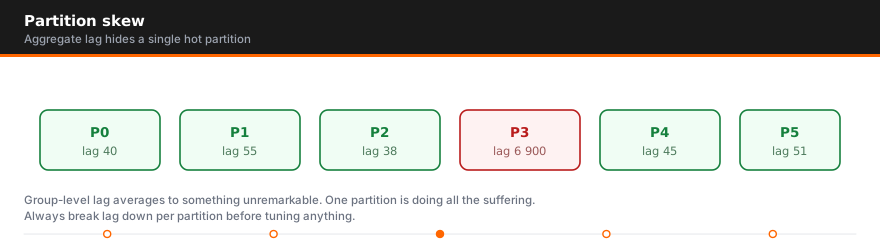
A hot partition receives a disproportionate share of traffic, and it's the classic failure mode of key-based partitioning. Common causes:
- Low-cardinality keys — hashing on
countrywhen 60% of traffic is one country sends most records to one partition. - Celebrity keys — one tenant, device, or user generates orders of magnitude more events than the rest, so all of them go to the same partition.
- Skewed custom partitioners — hand-rolled routing that concentrates load on partition 0 or a small range.
The symptoms: one broker runs hot while others idle, one consumer lags while its peers are caught up, and produce latency climbs for a subset of keys. To fix a hot partition:
- Re-key on higher cardinality. Use
userIdinstead ofregion, or a composite key liketenantId:deviceId, so hashing spreads load to an appropriate partition for each entity. - Salt the hot keys. Append a small random suffix (
bigTenant-0…bigTenant-7) to fan one hot key over several partitions — accepting that you now must re-aggregate, since ordering only holds per salted key. - Split the whale. Route your largest tenant to a dedicated topic with its own partition strategy, sized for its traffic alone.
- Drop the key entirely where ordering is not actually required — many pipelines use keys out of habit, paying a skew penalty for a guarantee nobody consumes. The sticky partitioner will balance keyless traffic almost perfectly.
Monitor partition health before users notice: per-partition produce rate and log size (bytes-in skew), per-partition consumer lag, and broker disk/network imbalance. Alerting on partition throughput skew — say, any partition sustaining 3x the topic median — catches most hot-partition incidents while they're still cheap to optimize.
Why Repartitioning Hurts (Plan Ahead)
You can increase the number of partitions on a live Kafka topic with kafka-topics.sh --alter, but you cannot decrease it — ever. And increasing is not the harmless fix it appears to be: hash(key) % numPartitions changes the moment the count changes, so existing keys start mapping to a different partition. Old events for customer-42 sit in partition 3 while new ones land in partition 7. Message ordering for those keys is broken at the seam, and any Kafka Streams state built from that topic must be rebuilt or migrated.
The honest fix for a badly partitioned keyed topic is a full migration: create a new topic with the right count, mirror the data over, cut consumers across, and retire the original. That is days of careful work on a busy production cluster, which is exactly why effective Kafka partition planning up front — with headroom — is worth 10x the effort of the cleanup.
KRaft and Partition Limits: What KIP-500 Changed
Kafka's old ZooKeeper-based control plane put a practical ceiling on cluster-wide partition counts — commonly cited around 200,000 partitions — because controller failover and metadata propagation slowed to a crawl beyond it. KIP-500 replaced ZooKeeper with KRaft, a built-in Raft-based metadata quorum, and it is the only supported mode as of Kafka 4.0. KRaft stores metadata in an internal event log, so a new controller takes over in near-constant time and clusters scale to millions of partitions.
What KRaft does not change: per-topic sizing math, hot partitions, ordering semantics, or the pain of repartitioning. It raises the ceiling on Kafka partition management at cluster scale; it doesn't make the strategy used on each topic any less consequential. If anything, migrating a legacy ZooKeeper cluster to KRaft is itself a project where partition layout mistakes get expensive to carry forward.
Kafka Partition Strategy Best Practices
- Benchmark real per-partition throughput on your own Kafka brokers; don't reuse someone else's numbers.
- Size partition counts with
max(T/P, T/C)plus 2–3x headroom, divisible by your expected number of consumers. - Default to keys only when you need per-key ordering; otherwise let the sticky partitioner assign keyless records for maximum balance.
- Keep key cardinality at least 10–100x the partition count to keep distribution even.
- Use
CooperativeStickyAssignorto shrink rebalance pauses. - Monitor partition-level lag, bytes-in skew, and broker imbalance — and alert on skew, not just totals.
- Document your partition strategy per topic so the next engineer doesn't "fix" a deliberate choice.
Getting this right is a design problem; keeping it right at 2 a.m. is an operations problem. AceMQ's senior engineers run and rescue production Kafka for enterprises every day — from partition strategy reviews and capacity planning to emergency response with a 15-minute SLA, around the clock. Explore AceMQ's enterprise Kafka services or talk to us about 24/7 coverage for your cluster.
This is step two of ten in the Kafka operations guide, which takes the operational decisions in the order they arrive on a production estate.
Frequently Asked Questions
Can I change the number of partitions after creating a topic?
You can only increase it, never decrease it. Increasing partitions remaps hash(key) % numPartitions, so records with the same key start landing on a different partition than their history — breaking per-key ordering at the transition. For keyed topics, the safe path is migrating to a new, correctly sized topic.
How does Kafka decide which partition a message goes to?
The producer decides, client-side. With a key, Kafka uses a murmur2 hash of the key modulo the partition count. With no key, the sticky partitioner fills batches to one partition at a time while balancing overall. Producers can also override this by implementing a custom partitioner or setting the partition explicitly on the record.
What causes a hot partition, and how do I fix it fast?
Low-cardinality or heavily skewed keys are the usual cause: too much traffic hashes to one partition, overloading its broker and consumer. Immediate mitigations are salting the hot key across several partitions, re-keying on a higher-cardinality field, or isolating the heavy tenant on its own topic.
How many partitions are too many?
There's no universal number, but each partition adds broker memory, file handles, replication work, and rebalance time. Per-broker, staying in the low thousands of partitions is a widely used guideline; KRaft mode raises cluster-wide limits dramatically, but per-topic overprovisioning beyond ~3x projected peak throughput usually costs more than it protects.
Does partition count limit how many consumers I can run?
Yes. Within one consumer group, each partition goes to exactly one consumer (though one consumer can read multiple partitions), so consumers beyond the partition count sit idle. Your maximum read parallelism equals your partition count — which is why consumer throughput, not broker capacity, should usually drive the sizing calculation.

Author
Talk to an engineer
Need a hand with Kafka?
Senior engineers who run it in production. Get a quote or a free consultation, no sales pitch.
Guides, comparisons and research


